Samsung Browser Hits Windows: Is It Time to Ditch Chrome?
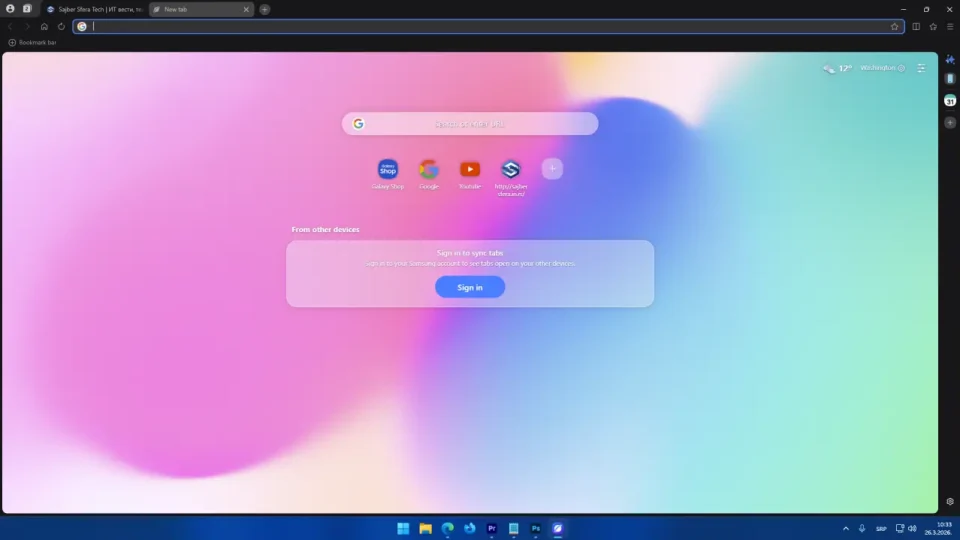
After years of being a staple on mobile devices, one of the most beloved browsers in the Galaxy ecosystem is finally stepping onto the big stage. Samsung Browser (formerly known as Samsung Internet) has officially graduated from its beta phase and is now available for Windows users, bringing a powerhouse of AI integration and ecosystem continuity that might give even die-hard Chrome fans a reason to switch.
In a world where browsers are becoming gateways for AI assistants, Samsung isn’t playing it safe. With its new “Agentic AI” capabilities and deep-rooted connectivity with Galaxy devices, this browser isn’t just another Chromium alternative—it’s a smart assistant living right in your tabs.
Seamless Continuity: From Phone to PC in One Click
The core strength of the Samsung Browser lies in its ability to bridge the gap between mobile and desktop experiences. Unlike the standard sync offered by competitors, Samsung goes a step further with its State Sharing feature.
This means you don’t just see your history and bookmarks; you can resume reading a page on your PC exactly where you left off on your Galaxy phone, with the identical scroll position. With Samsung Pass integration, all your saved login credentials and biometric keys are accessible on Windows, making shopping and logging in faster and more secure than ever.
The Perplexity Revolution: What is “Agentic AI”?
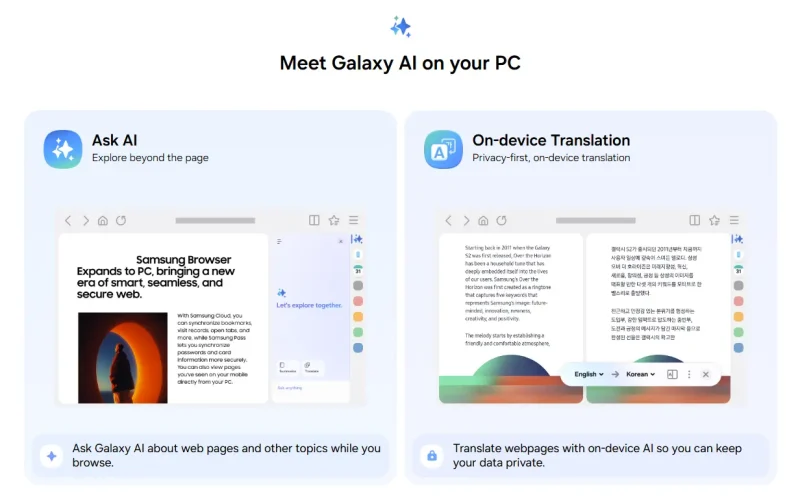
What truly sets Samsung Browser apart from the competition is its partnership with AI giant Perplexity. Instead of a standard chatbot, Samsung introduces “Agentic AI”—an intelligence that understands the context of your workflow.
- Contextual Planning: If you’re reading a travel blog about Seoul, you can activate the AI assistant and ask: “Create a 4-day itinerary based on the places mentioned in this article.” The AI will analyze the content and generate a personalized plan.
- Multi-Tab Analysis: The browser can simultaneously analyze information across multiple open tabs, comparing product specs or summarizing news from different sources into one cohesive report.
- Natural Language History Search: Forget struggling with keywords. You can ask: “Find that smartwatch I was looking at last week,” and the AI will identify exactly what you’re referring to.
- Smart Video Scrubbing: Thanks to video content understanding, you can tell the AI to find a specific segment in a long video, and it will jump directly to that moment, eliminating the need for manual scrubbing.
Technical Requirements and Availability
Built on the Chromium engine, Samsung Browser for Windows ensures compatibility with most of the extensions you already use in Chrome.
Don’t miss this

- Operating System: Windows 10 (version 1809 and above) or Windows 11.
- Ecosystem: While the browser works on any PC, the advanced continuity features are currently optimized for the Galaxy Book laptop series (Series 3, 4, 5, and 6).
- AI Limitations: Note that the most advanced “Agentic AI” features are currently rolling out by region. While initially launched in the US and South Korea, a wider global expansion—including the European market—is slated for late 2025 and 2026.
Conclusion: Is it Worth the Switch?
If you already use a Galaxy phone and tablet, Samsung Browser on Windows is the logical final piece of a perfectly synchronized workspace. With AI features that act as real productivity tools rather than just gimmicks, Samsung has set a high bar that Google and Microsoft will have to hustle to match.
You can download the browser directly from the Microsoft Store or the official Samsung website.
FAQ – Frequently Asked Questions
Do I need a Samsung phone to use Samsung Browser on Windows?
No, you can install the browser on any Windows PC. However, to use sync features and Samsung Pass, a Samsung account is required, and a Samsung mobile device is highly recommended for the best experience.
Does Samsung Browser support Chrome extensions?
Yes! Since it is based on Chromium, Samsung Browser allows you to install extensions directly from the Chrome Web Store.
Is the browser free to use?
Yes, Samsung Browser is completely free to download and use.
Why don’t I see the AI features in my version yet?
Agentic AI features (powered by Perplexity) are being rolled out gradually by region. Ensure you have the latest version (30.0.0.95 or higher) and stay tuned for updates regarding availability in your specific country.

How does it handle system resources compared to Chrome?
Initial tests suggest that Samsung Browser is often less RAM-hungry than Chrome, especially when using built-in tab optimization and u0022sleeping tabu0022 tools.